


TIDAL Music: HiFi sound
4.460.55K Reviews
App Specs
- Version
- Varies with Device
- Updated On
- License
- Free
- Downloads
- 10,000,000+
- Developer
- TIDAL
- Categories
- Music & Audio
- Platform
- Android, iOS
Screenshots

 Analysis by AppCompare
I approach a music app differently depending on the day: sometimes I want a familiar album with no fuss, and sometimes I want it to help me find something new. TIDAL Music: HiFi sound is built for both, but its clearest reason to choose it is how seriously it treats listening quality. It’s a free download from TIDAL in the music and audio category, with in-app purchases ranging from $0.99 to $35.50 per item. The app is rated for teens, has an average rating of 4.1 from around 356,000 ratings, and has passed 10 million installs. Those figures suggest a well-established service, though the right fit still depends on how you listen and what you value.
A routine that makes the library useful
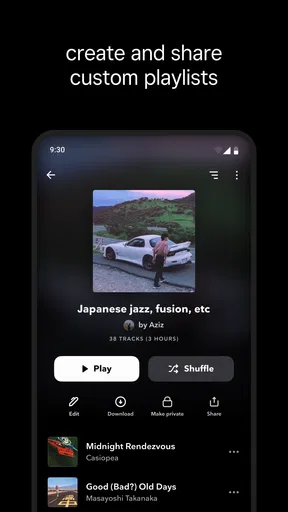
My most reliable way to use a streaming app is to give it a simple job: find a track, save it somewhere I can return to, and make listening easy the next time. With TIDAL, that means using search when I know what I want, then collecting albums, tracks, or playlists around a purpose rather than letting every discovery disappear into a long history. A playlist for focused work, one for a walk, and one for familiar favorites can make the home screen feel more personal without requiring a complicated system.
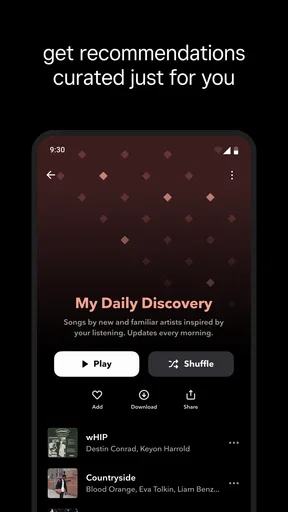
That habit also helps when recommendations are still learning what I like. I wouldn’t judge a personalized mix from a single session; I’d listen across different moods and deliberately play the artists I want more of. If a mix misses, I’d switch to an album or an editorial playlist instead of repeatedly skipping through it. The useful point is not that any recommendation engine gets every choice right, but that a mix of deliberate listening and curated selections gives me more control than relying on one feed.
Check the quality settings before settling in
Sound quality is TIDAL’s strongest reason to compare it with other music services, but the benefit depends on the whole listening chain. I’d check the available audio-quality options and choose deliberately for the device and connection I’m using. At home, better headphones or speakers can reveal more than ordinary phone speakers; on a noisy commute, the difference may be harder to notice. This is a practical trade-off, not a reason to chase the highest setting in every situation.
Offline listening deserves the same planning. Before a flight, a long trip, or a patchy-signal commute, I’d save the albums and playlists I expect to use and check that they are available offline before leaving. This makes a bigger difference than building an enormous download collection I never revisit. It also lets me be selective about storage, especially if I listen to full albums rather than a small set of repeat tracks.
Offline playback and an ad-free listening experience are central parts of the appeal, but they don’t remove the need to choose content in advance when I know I’ll be away from reliable internet. My simple rule is to prepare a short, dependable queue the night before a trip instead of trusting that I’ll remember in the morning. That small habit prevents the annoying moment of opening a music app with nothing ready to play.
Make discovery work for your mood
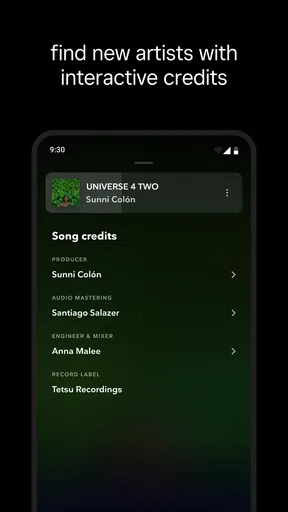
For new music, I’d treat editorial playlists as a starting point rather than a verdict on my taste. They’re useful when I want a ready-made direction, while artist pages and albums are better when one track catches my attention and I want to understand the musician’s wider sound. A practical discovery loop is to play a playlist, save only the tracks I’d choose again, then explore one saved artist later. It keeps discovery from turning into a pile of half-remembered songs.
Worth Reading Before You Choose

EA SPORTS FC Mobile 26 Is a Bigger Football Game, but It Takes Time

Flipboard Shows What News Apps Must Do Beyond the Feed

Switching to Android Auto Means Rethinking Your Driving Routine

Google Calendar Makes a Crowded Week Easier to Manage

Ludo King Makes the Most of the Minutes Between Plans

Baby Panda World Brings Quick Play to Modern Phones, but Its Game Library Feels Busy
The catalog’s breadth is appealing, but size alone does not make a service easy to browse. Search is most helpful when I have a name, album, or track in mind; when I don’t, a mood-based playlist or personalized mix gives me a lower-effort entry point. I’d also use playlists as temporary tools: make one for a dinner or a work session, then keep only the tracks that still matter afterward. That keeps the library navigable rather than treating every occasion as a permanent collection.
Everyday use can be as ordinary as getting ready in the morning. I might start with an album I know, move to a playlist while making breakfast, and save one unfamiliar track to revisit on the commute. Later, with headphones and more attention, I can decide whether that artist deserves a deeper listen. That split between casual background play and intentional listening is where TIDAL feels most flexible: it can serve a routine without making every session a search for the perfect song.
Where it fits among music apps
Compared with the usual alternatives, TIDAL makes the most sense if audio quality is part of the decision rather than a setting you never think about. A simpler or more budget-focused service may suit someone who mainly wants familiar hits, easy shared listening, or the lowest ongoing cost. TIDAL is less compelling if you mostly play music through a basic phone speaker and rarely notice differences in audio presentation. In that case, a service you already use may be more convenient, even if its sound options are less central to its identity.
It is also worth separating the free download from the cost of ongoing use. The app itself can be installed without an upfront purchase, while in-app purchases are available; I’d check the current options in the app before deciding what makes sense for my budget. I wouldn’t assume that every feature or listening arrangement is included simply because the app is free to download. If keeping monthly spending predictable is the main goal, compare the available choices carefully and consider whether the listening benefits are noticeable in your own setup.
TIDAL has been available since October 28, 2014, so it is not a new experiment in music streaming. Longevity and a sizable audience can be reassuring, but neither guarantees that its layout or recommendations will suit every listener. I’d give myself a few sessions to test the everyday basics: can I find my regular artists quickly, do I enjoy the suggestions, and does the sound difference matter on the headphones I actually own? Those answers are more useful than choosing based on reputation alone.
Who will appreciate it—and who may not
I’d recommend trying TIDAL if you listen closely, use headphones or capable speakers, and want a service where audio quality is a meaningful part of the experience. It also suits people who enjoy building playlists and exploring music beyond their usual rotation. The best reason to keep it is not a technical label; it is whether you notice details in familiar recordings and find yourself returning to the music you discover.
I’d be more cautious if you want the cheapest possible way to play background music, depend on a particular social or device ecosystem, or dislike preparing downloads ahead of travel. High-quality streaming can also use more data than a lower-quality setting, so I’d choose settings with mobile use in mind rather than leaving every session on the same choice. If you share a listening space or account with others, check how the available plan and playback options fit your household before relying on them.
The Sound Experience
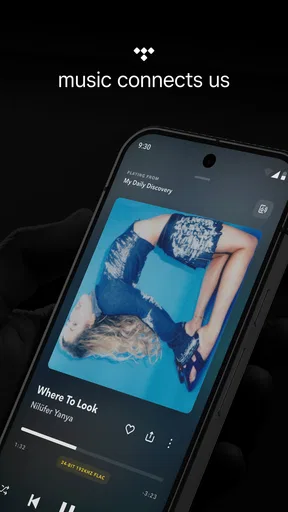
The first thing that struck me with TIDAL Music is the sound quality. If you're an audiophile, you'll understand the magic of HiFi sound. TIDAL offers lossless audio, which means you get CD-quality music, and believe me, it makes a difference. The clarity and depth are something else. I've rediscovered songs I thought I knew inside out, picking up on details that were previously lost in translation.
Now, they also offer Master Quality Authenticated (MQA) tracks. I know, it sounds technical, but in simple terms, it's like having the artist perform right in front of you. If you have the right equipment, this can be a real treat.
Music Library and Discoverability
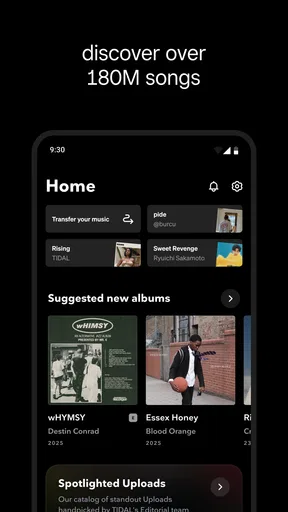
TIDAL boasts a library of over 80 million tracks, so there's plenty to explore. From the latest chart-toppers to obscure indie bands, they've got it all. I spent hours diving into different genres and discovering new artists.
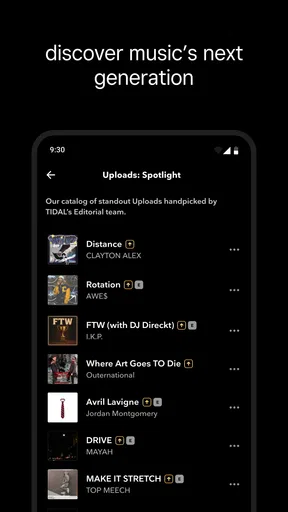
One feature I particularly enjoyed is the curated playlists. TIDAL's editorial team does a fantastic job crafting playlists for every mood and occasion. Whether you're working out, chilling at home, or throwing a party, there's something ready for you.
And let's not forget about the "TIDAL Rising" section, which highlights emerging artists. I've found some gems here that I wouldn't have come across otherwise.
Interface and Usability
As someone who appreciates a good user interface, TIDAL doesn't disappoint. The app is sleek and intuitive, making it easy to navigate. The dark theme is easy on the eyes, especially during late-night listening sessions.
Creating and managing playlists is a breeze, and the search function is robust. You can search by artist, album, or track, and the results are pretty accurate. Plus, the "My Mix" feature gives you personalized playlists based on your listening habits, which is a nice touch.
Exclusive Content and Features
One thing that sets TIDAL apart is its exclusive content. If you love concerts, the app offers live streaming of various performances, and some are even available in 360-degree video format. It's like having a front-row seat without leaving your couch.
Then there's TIDAL X, which grants subscribers access to special events, meet and greets, and more. It's a cool way to connect with artists beyond just streaming their music.
Subscription Plans and Pricing
Of course, all these features come at a price. TIDAL offers different subscription plans, including a HiFi plan for the audiophiles and a more affordable Premium plan. While it's not the cheapest option out there, the quality and content justify the cost, especially if you're serious about your music.
They also offer student and family plans, which can be a good way to save a bit of cash. Plus, there’s usually a free trial period, so you can test the waters before committing.
Final Thoughts
Overall, TIDAL Music: HiFi sound is a solid choice for anyone who values high-quality audio and exclusive content. It's got a rich library, intuitive design, and some unique features that you won't find elsewhere.
While it might not be the best fit for someone looking for a budget-friendly option, if you're willing to invest in your music experience, TIDAL is definitely worth checking out. So, if you're curious, why not give it a try and see if it strikes the right chord with you?
Pros
- High-quality HiFi audio streaming available.
- Extensive music library with diverse genres.
- Offline mode for music on the go.
- Curated playlists by music experts.
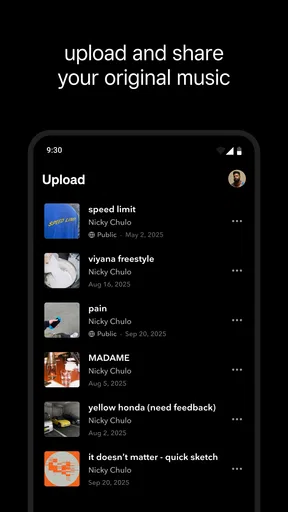
- Unique artist exclusives and interviews.
Cons
- Requires a premium subscription for HiFi.
- Interface can be overwhelming for new users.
- Limited social sharing features.
- High data usage with HiFi streaming.
- Not all artists are available.
FAQs for TIDAL Music: HiFi sound
What is TIDAL Music, and how does it differ from other streaming services?
TIDAL Music is a subscription-based music streaming service known for its high-fidelity sound quality and exclusive content. Unlike other platforms, TIDAL offers HiFi and Master audio quality, providing an immersive listening experience. It also features exclusive releases, music videos, and curated playlists, making it a unique choice for audiophiles and music enthusiasts.
Do I need a specific device to enjoy TIDAL's high-quality sound?
While TIDAL is available on numerous devices, including smartphones, tablets, and computers, to fully experience its HiFi and Master quality sound, it’s recommended to use high-quality headphones or speakers. Devices that support high-resolution audio will ensure you get the most out of TIDAL's superior sound offerings.
What are the subscription options available on TIDAL?
TIDAL offers several subscription tiers to cater to different user needs. The main options include TIDAL Premium, which provides standard sound quality, and TIDAL HiFi, offering lossless, CD-quality audio. Additionally, there are family plans, student discounts, and military pricing, allowing users to choose based on their preferences and budget.
Does TIDAL offer offline listening, and how does it work?
Yes, TIDAL supports offline listening, allowing users to download tracks, albums, and playlists directly to their device. This feature is particularly useful for enjoying music without an internet connection, such as during travel. Simply select the content you wish to download, and it will be available offline within the app.
Is there a free trial available for new users on TIDAL?
TIDAL typically offers a free trial period for new users, enabling them to explore the platform's features before committing to a subscription. The trial period varies, but it often lasts for 30 days. During this time, users can access all the features of their chosen plan, including HiFi sound, to determine if it suits their needs.


